
EagleEye — Document Conversion System
EagleEye converts English and Urdu bank documents into structured data, then keeps people in control with maker/checker review. It runs on-prem by default.
How EagleEye works
A view of how work moves through EagleEye.
Review an extracted bank document
In this fictional example, a bank receives a scanned remittance form with English and Urdu labels. The form shows a transfer amount of PKR 15,000.
Extract the fields
OCR reads the scan and proposes structured values for the form. In this example, a faint digit causes the amount to be read as PKR 75,000.
Correct the amount
The maker compares the extracted value with the scan and corrects it to PKR 15,000. The original and corrected values are retained for review.
Check against the source
A separate checker verifies the corrected amount against the source before approving the record. The maker cannot approve their own work.
Product screens
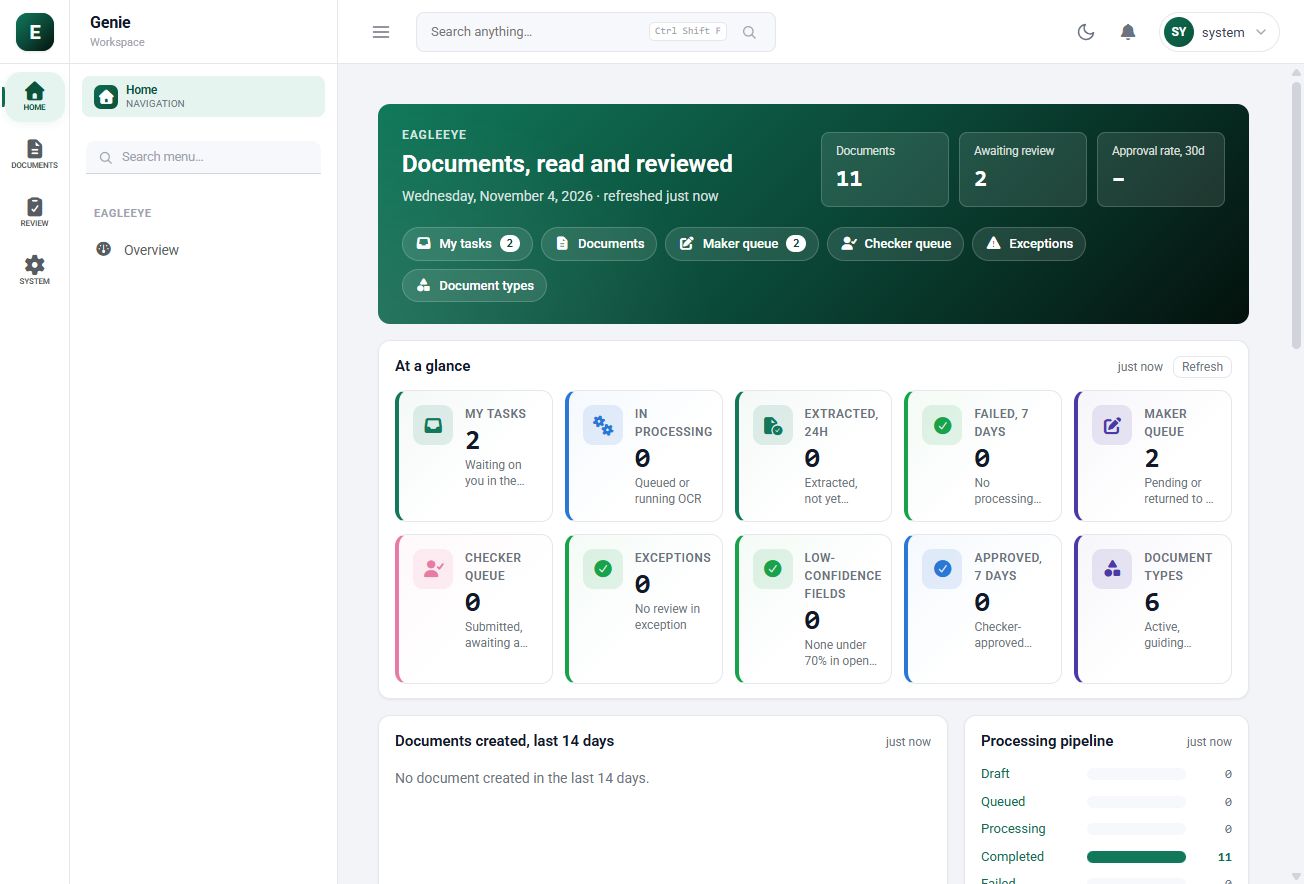
Track processing, exceptions and the maker and checker review queues.
The challenge
Teams looking at EagleEye usually face manual keying, mixed languages and data sensitivity. Staff retype every form field. English and Urdu forms arrive together. Customer documents must stay under bank control. Left alone, these problems slow people down and make results harder to prove.
Manual keying
Staff retype every form field.
Mixed languages
English and Urdu forms arrive together.
Data sensitivity
Customer documents must stay under bank control.
What it does
EagleEye covers KYC, Remittance, Financing, Trade Finance, Branch vouchers and Archival in one solution. Each capability below does a specific job, and together they follow the work from upload to check.
KYC
Customer onboarding documents.
Remittance
Remittance forms.
Financing
Financing applications.
Trade Finance
Documents with rule checks.
Branch vouchers
Daily branch paperwork.
Archival
Digitise existing records.
How it works
EagleEye follows 5 clear steps. PDF, PNG, JPEG and TIFF enter a durable queue. From there, work moves through each stage until the final step: checkers approve; self-approval is blocked.
Upload
PDF, PNG, JPEG and TIFF enter a durable queue.
OCR
A GPU-based engine reads each page on-prem.
Extract
Fields are mapped by document type.
Review
Makers compare values in the workbench.
Approve
Checkers approve; self-approval is blocked.
Outcomes
The result is a clearer way of working: OCR and extraction, review workbench, verbatim and corrected values, one mixed-language flow and on-prem processing. These are the changes teams should expect once EagleEye is part of daily operations.
Who it's for
EagleEye is designed for Operations, Trade desk, Branches and Compliance. Each group gets something different from it, as the cards below show.
Operations
Less manual keying.
Trade desk
Rule-checked documents.
Branches
Voucher digitisation.
Compliance
Traceable corrections.
AI integrated
EagleEye integrates with the Exceleron AI Layer, on-prem or in the cloud, using RAG for grounded answers and MCP to connect tools and data.
Before and after
What changes for your team with EagleEye.
Before
- Manual data entry
- Paper-based checks
- Lost correction history
- Separate English and Urdu handling
- Cloud concerns
With EagleEye
- OCR and extraction
- Review workbench
- Verbatim and corrected values
- One mixed-language flow
- On-prem processing
Technology explained
These are the technologies and formats EagleEye works with, explained in plain language.
- Scanned or digital PDF documents.
- PNG
- Lossless image files.
- JPEG
- Standard photo and scan images.
- TIFF
- Image format common in document scanners.
- English
- Printed English documents and forms.
- Urdu
- Urdu documents and forms.
- OCR
- Optical Character Recognition: turns document images into text.
- Maker/checker
- One person prepares the record and another approves it.
- Rule checks
- Automatic validation of fields against business rules.