
Trace — Site Security System
Trace connects vision detection to security workflows, so an event on site becomes an owned incident. Security teams manage sites, sources, zones and rules in one place, alongside network KPIs and alarms.
How Trace works
A view of how work moves through Trace.
Turn a camera detection into an assigned response
In this fictional example, a camera detects a person in a restricted loading area. The security team needs to decide whether the detection requires action.
Define the zone and rule
Mark the area on the camera view and configure when a detection should become an event.
Create and assign the incident
When a detection matches the rule, the workflow creates an incident and assigns a response task.
Record the response
The assigned responder checks the event, acts as needed, and closes the task with a record of what happened.
Product screens
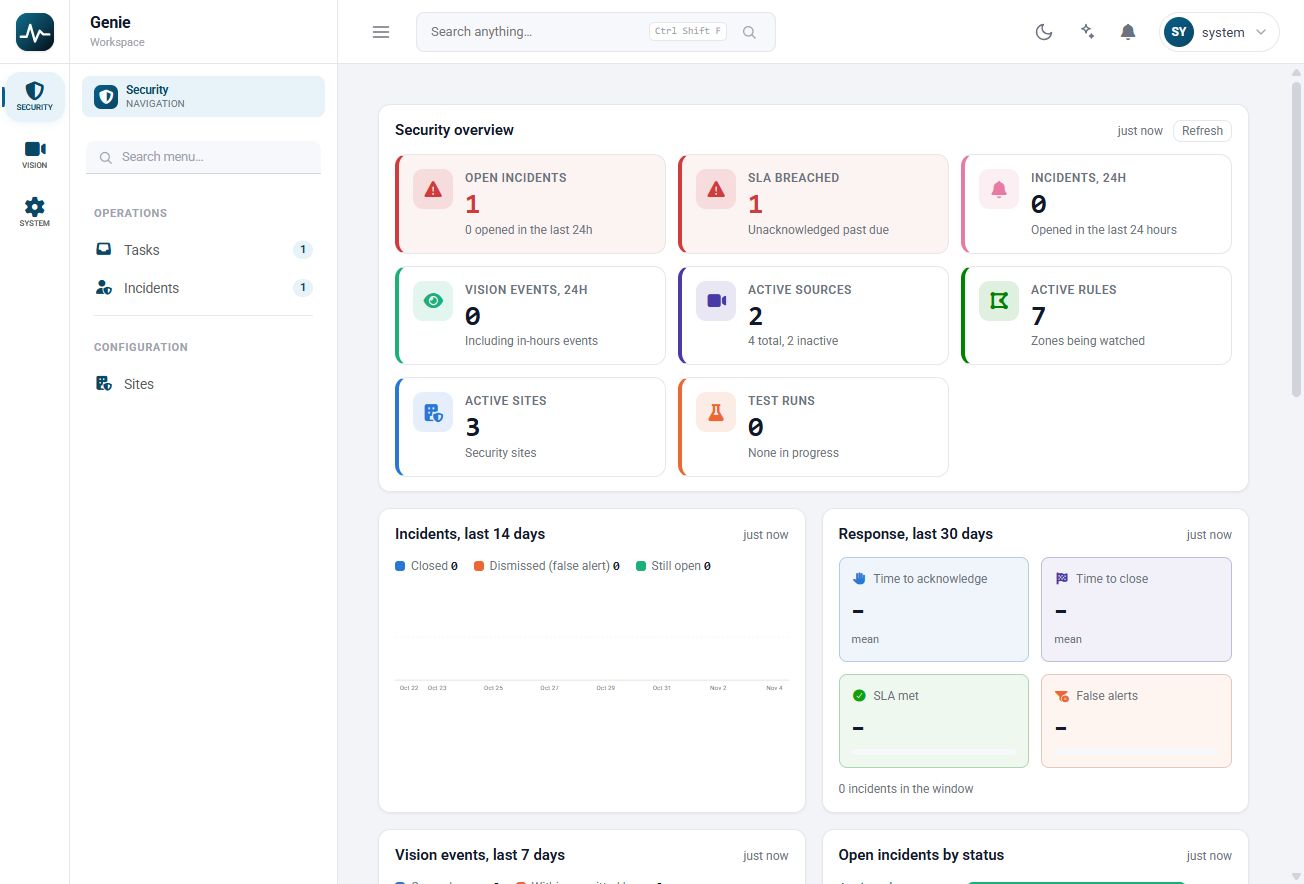
Track incidents, response deadlines, active cameras and configured rules.
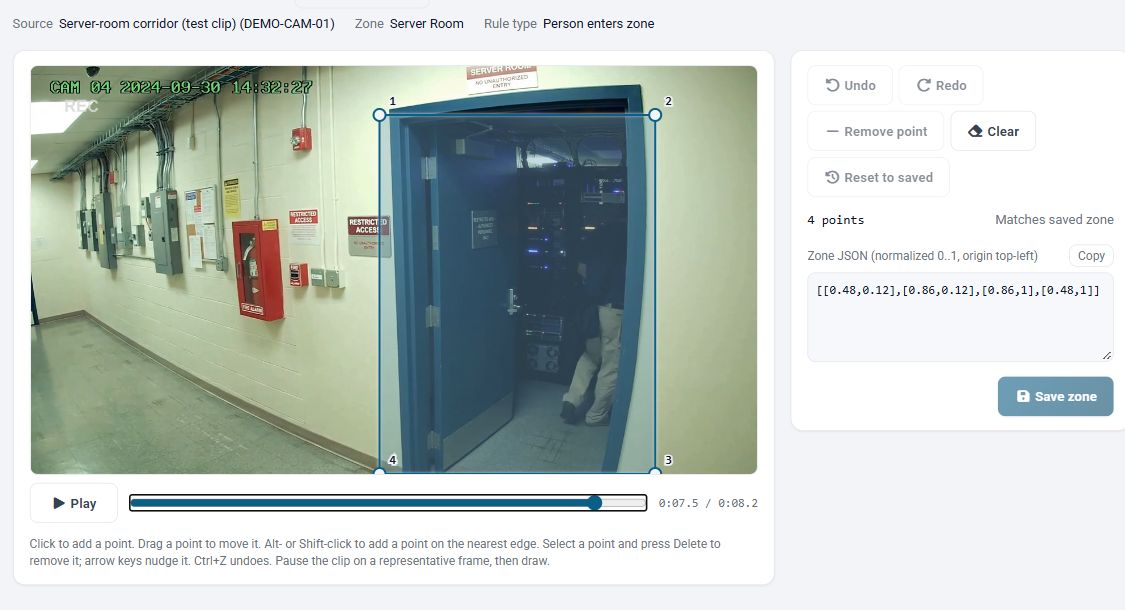
Draw the monitored zone on a test clip and review it against a representative frame.
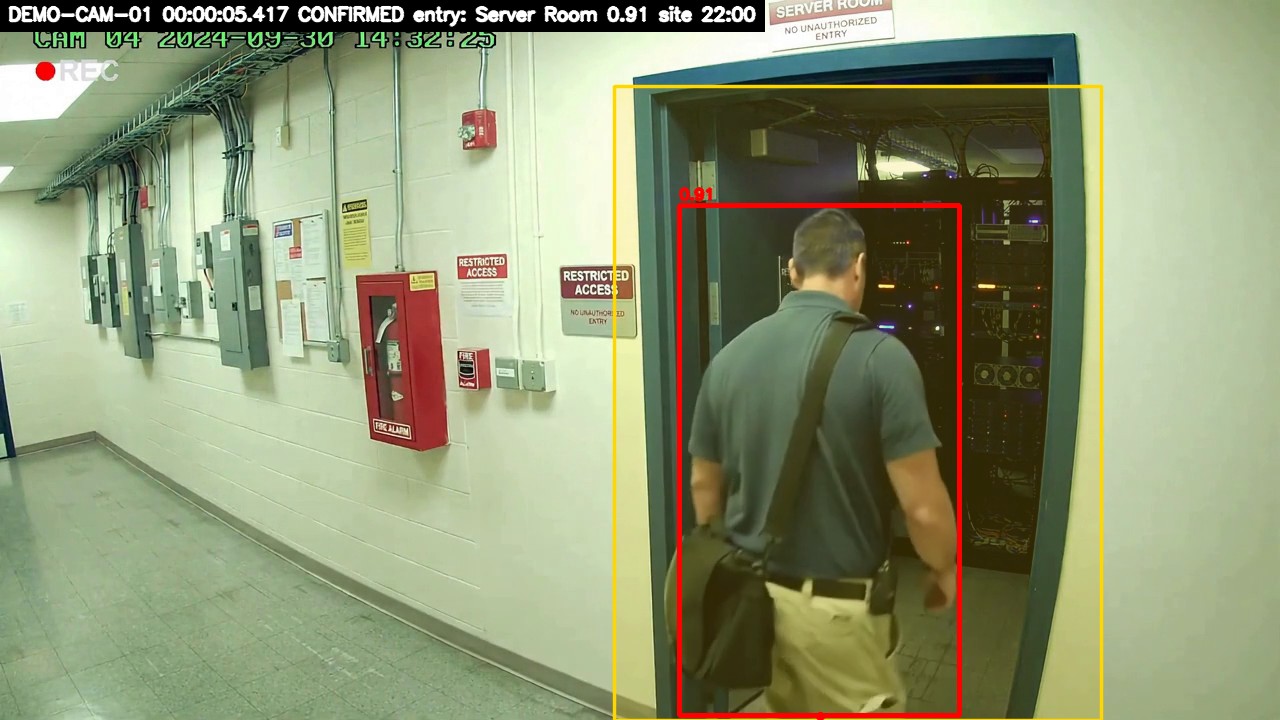
A completed test run shows the monitored zone and the detected person entering it.
Product resources
The challenge
Teams looking at Trace usually face unwatched screens, no follow-through and dispersed sites. Nobody can watch every feed. Events are seen but not tracked. Sites are spread across many locations. Left alone, these problems slow people down and make results harder to prove.
Unwatched screens
Nobody can watch every feed.
No follow-through
Events are seen but not tracked.
Dispersed sites
Sites are spread across many locations.
What it does
Trace covers Incidents, Sites and sources, Zone editor, Rules and test runs, My Tasks and NetOps in one solution. Each capability below does a specific job, and together they follow the work from watch to close.
Incidents
Every event becomes a tracked record.
Sites and sources
Organise locations and video sources.
Zone editor
Draw the areas that matter.
Rules and test runs
Tune and test before going live.
My Tasks
Clear work for each responder.
NetOps
KPI explorer, alarms and anomalies.
How it works
Trace follows 5 clear steps. Add sites, sources and zones. From there, work moves through each stage until the final step: responders act and close it.
Define
Add sites, sources and zones.
Detect
The vision worker analyses video.
Match
Rules decide what becomes an event.
Assign
A workflow creates the incident.
Resolve
Responders act and close it.
Outcomes
The result is a clearer way of working: vision detection, workflow incidents, zone-based rules, task ownership and one operations desk. These are the changes teams should expect once Trace is part of daily operations.
Who it's for
Trace is designed for Security, Site managers, Operators and Responders. Each group gets something different from it, as the cards below show.
Security
Tracked incidents.
Site managers
Location oversight.
Operators
Security and network view.
Responders
Clear task lists.
AI integrated
Trace integrates with the Exceleron AI Layer, on-prem or in the cloud, using RAG for grounded answers and MCP to connect tools and data.
Before and after
What changes for your team with Trace.
Before
- Passive video
- Untracked events
- Manual site checks
- No clear owner
- Security and NetOps apart
With Trace
- Vision detection
- Workflow incidents
- Zone-based rules
- Task ownership
- One operations desk
Technology explained
These are the technologies and formats Trace works with, explained in plain language.
- Computer vision
- Models that detect people and objects in video.
- ONNX Runtime
- Engine that runs vision models efficiently on standard hardware.
- Zones
- Drawn areas of a camera view where rules apply.
- Rules
- Conditions that decide when a detection becomes an event.
- Workflows
- Defined steps, approvals and owners that move work to completion.
- ClickHouse
- Column-based database built for fast queries on very large datasets.
- Event API
- Secure interface that delivers detections to the platform.